Oh, the lovely fickleness of an April day! — W. H. Gibson
Because of State of Colorado and local health orders related to the Covid-19 pandemic, the Pagosa Springs Photography Club will not be holding our regular monthly meeting on April 8. We will also not be doing any in-person group outings during April.
We encourage our members to continue to practice their craft and develop their photographic skills. There are plenty of photographic opportunities near, and in, your homes. Just use your imagination, and maintain appropriate social distance. This is also a great time to make sure your backups are up to date, to make a few prints, or to develop your post-processing skills. Learn something new and different. Several on-line learning sources have made their content free for the time being. These include:
Continuing to be creative and engaged can be a huge emotional boost while you are staying home to stay healthy. Also, consider taking part in our on-line Photography Club Shutter Therapy challenges. The first week (through April 6) is on the theme “Spring.” To view or participate, check out our Facebook page at https://www.facebook.com/PagosaPhotoClub/ and view the photos in the comments of the March 29 post on Spring Shutter Therapy.
The March 11, 2020 meeting of the Pagosa Springs Photography Club will be held at 6 p.m., at The Community United Methodist Church, 434 Lewis Street. Our speaker this month will be Club member Dave Anderson, who will give a presentation onBlack and White Photography in the Digital Age.
Black & white photography can be useful for emphasizing textures, shapes and contrasts in images, for creating more abstract views of a scene, creating dramatic sky or sky-sun combinations in images, and for architectural and fine art photography. The presentation will discuss different methods of creating black and white photographs, and the use of digital filters and presets to produce black & white images in Photoshop and Lightroom post-processing software, with examples comparing color and black & white versions of the same image.
Dave Anderson has a Ph.D. in Chemistry and worked before retirement as a research scientist on malaria, multi-drug resistant bacteria, disease biomarker discovery, drug target identification and other areas. His photographic interests include landscape and nature photography and occasionally urban and abstract photography.
Club members are encouraged to bring up to five photos on a thumb drive to share with the group after the presentation, if time permits. If you have some black & white images of your own, this would be a great month to bring them! (Please note the new limit of five photos, designed to allow more time to appreciate and discuss the images.)
The Pagosa Springs Photography Club promotes educational, social and fun interactions between all who enjoy making and viewing great photography.The club sponsors educational programs and outings to help photographers hone their skills. Membership is just $25/calendar year for individuals and $35 for families. Non-members are invited to attend a meeting to learn more about the club. For membership information visit our website at https://pagosaspringsphotoclub.org/about/ .
The February 12 meeting of the Pagosa Springs Photography Club will be held at 6 p.m., at The Community United Methodist Church, 434 Lewis Street. Our speaker will be Doug Coombs, on Creating a signature for digital artwork.
Join us for socializing at 6 p.m., followed by a brief business meeting and presentation at 6:30 p.m. Club members are encouraged to bring up to five photos on a thumb drive to share with the group after the presentation, if time permits.
Doug will show how to create a signature for your digitally produced photographs and artwork using Photoshop. Such a signature can be stored as a .png image to be used from any post processing tool including Lightroom and Photoshop. He will discuss downloading and adding additional fonts to Photoshop, concepts related to font customization, and will demonstrate in real-time creation of a signature and how to use it in Lightroom and Photoshop.
Doug is the chair and co-founder of the Los Alamos Adobe Users Group in New Mexico and a former chair of the Los Alamos Photography Club. He has been doing photography since high school, worked as a photographer and dark room tech in college, and fell in love with digital photography in 2003. Doug is primarily a landscape and nature photographer, with an affinity for birds and wildlife. He splits his time between Los Alamos, Pagosa Springs, and a generous amount of travel to various photogenic destinations.
The Pagosa Springs Photography Club promotes educational, social and fun interactions between all who enjoy making and viewing great photography.The club sponsors educational programs and outings to help photographers hone their skills. Membership is just $25/calendar year for individuals and $35 for families. Non-members are invited to attend a meeting to learn more about the club. For membership information visit our website at https://pagosaspringsphotoclub.org/about/ .
The first meeting of the Pagosa Springs Photography Club for 2020 will be held on Wednesday, January 8, 6 pm, at the Community United Methodist Church at 434 Lewis Street.
A major emphasis of the Club is to improve our photographic skills through learning from one another. In that vein, our January program will be Ten Images: Show and Tell. Members are requested to bring ten of your photographs from 2019 for discussion. These might be what you consider your best, your most interesting, or your most challenging photos of the year. Tell the group about each image, the situation when you took the photograph and what you like or might improve. The goal is to inspire Club members through a discussion of what makes good images, including aspects such as composition, impact, and technical quality.This will be a more extensive discussion than what we typically have during our image share sessions (which we won’t do this month).
As an introduction to the discussion, we will re-visit a 10 minute video presentation on the “f-5.3” method of critiquing images (Gregg Heid presented this method to the Club a couple of years ago). The video will give us a good starting point for thinking about what makes great images.
Club members area also invited to our first Photo Talk and Coffee breakfast of the New Year, at Dorothy’s Cafe, on January 23 at 9 AM. These breakfasts are a great way to have an informal chat with other club members about photographic topics (or other topics of interest).
The Photography Club’s membership year begins in January. For those of you have not yet paid your dues for 2020, you may do so at Club meetings. Dues will remain at $25 this year ($35 family). The membership form may be downloaded and mailed in with your payment (instructions on the form) if that is more convenient.
Some people look down on photographs that are merely pictures of other people’s art. This may seem a reasonable point of view, but like any other tenant of artistic evaluation it’s not necessarily fair. In the following paragraphs I will give you some ideas of how you might incorporate photographs of museum art into a portion of your portfolio.
A curator for a museum, famous or obscure, is faced with certain limitations. One limitation is history. He or she has to have a minor if not major collection of historical interest, or the collection is at risk of being deemed irrelevant. This tends to compromise aesthetic value for the sake of historical value.
Another consideration is cost. Not every museum can afford to spend $75 million for a Picasso. In fact, if you’re a curator with a $75 million budget, you would probably spend it on a wide variety of lower value art rather than one Picasso. So just like a private individual, a curator cannot always have what he or she wants but must compromise due to cost.
By photographing just certain art in a particular museum (cherry picking), you can acquire a collection with high aesthetic appeal and leave out the riffraff of historical interest or low value. Or if you’re an art historian, you can do the opposite.
Condition is another consideration. Paintings accumulates a patina of various elements from the atmosphere over time. That time is shorter in the tropic zone than in the temperate zone. A painting acquired by a museum may not be in prime condition. That means its colors and allure are clouded with the grunge of decades, maybe centuries. And the museum may not be able to afford to restore it.
Restoration is important for aesthetics. Large museums restore their most valuable paintings periodically. That might be every 50 years, every 100 years, or every 250 years. A restoration can be very expensive costing hundreds of thousands of dollars. Small museums can’t afford them often, and even large museums can only afford them for a portion of their collections.
By using Photoshop adroitly, you can restore art via a photograph to its original allure in many cases, and you can often do it quickly with a minimal effort. Thus, with some postprocessing, you can improve museum art for your own collection.
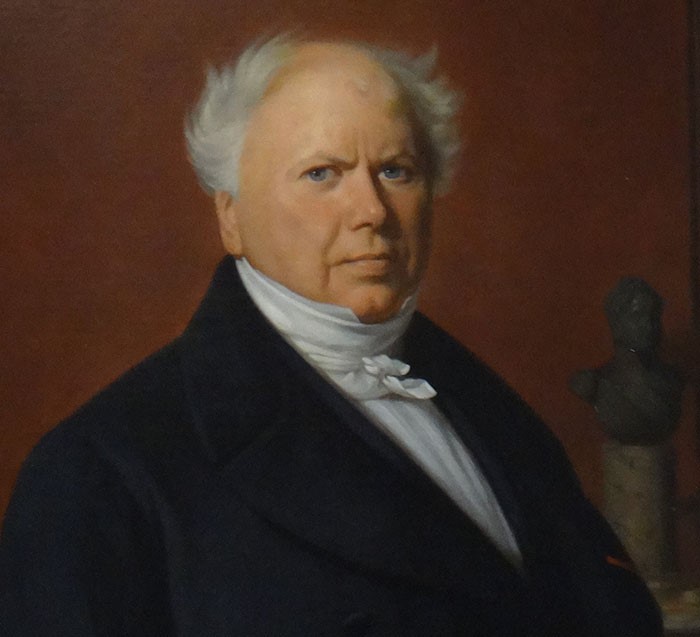
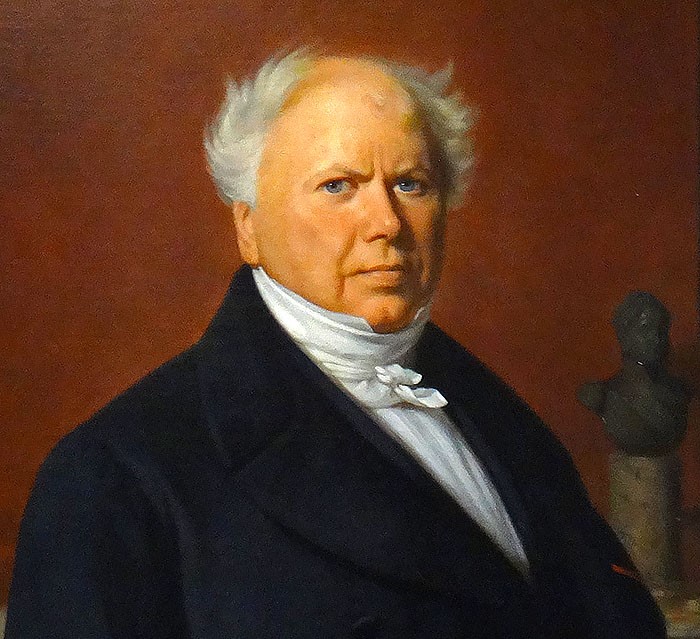
This example of digital restoration was done in less than two minutes in Photoshop. It’s not perfect because it has some inherent restoration problems. But with a half-hour of work in Photoshop, it could be significantly higher quality while keeping the artistic integrity intact.
In addition, it’s sad to say (and most people may disagree with me) that many original paintings and prints by great artists have less aesthetic value than their reproductions. It doesn’t matter whether the reproductions are color prints or digital media. If you’ve ever visited an art museum shop and viewed the posters and books, you know what I mean.
Another issue is lighting. Lighting in museums is always a big problem and is never perfect. Paintings reflect light in strange and often undesirable ways that apparently cannot be corrected. And where you stand in relation to the art also determines how you see it. Reflections are a major problem. Indeed, a painting that appears superb in one museum or one museum room if moved to another may show in a less appealing way.
If you can photograph art without the ambient reflections, you can acquire a personal art collection that’s an improvement over what people see in the museum. This is very difficult to do, however, and sometimes impossible without the cooperation of the museum.
Beyond photographing art there is the particular activity of photographing portions of other people’s art and incorporating such portions into artistic creations of your own. A painting or sculpture seems to be a self-contained entity that one would not have an inclination to break up into portions for use in another artistic creation. But not all art is necessarily self-contained. For instance, a portion of a sculpture that’s part of antique fireplace mantle might be exactly what you need to display on a metal print by itself or incorporate into some type of other artistic creation such as a poster, advertisement, or collage.
I have used this photograph (part of an antique mantle) in a poster.
All things considered, photographing paintings, prints, and other works of art has many practical uses and can even be profitable. Here are a few ideas:
Curate your own wonderful collection (digital)
Make accurate prints
Make altered prints (e.g., restoration)
Use in another artistic creation
Use for illustration (e.g., in text)
Use in posters
Incorporate into everyday artifacts (e.g., business cards)
Sell some of the above
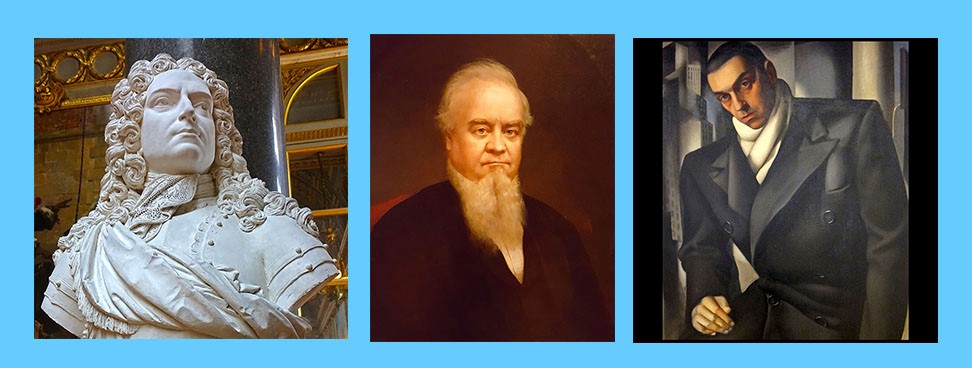
For fun, I’ve used the following museum portraits as my personal photograph in Facebook from time to time:
Through careful selection I found several works of art that show a close resemblance to me.
Fortunately, most museums permit photographing. Unfortunately, modern art is copyrighted going back to the 1930s. So, you have to be careful what you photograph and how you use it. You don’t want to violate a copyright. Nonetheless, if the museum owns the copyright and allows photographs, you’re probably safe.
But what about artists? What might they think about people photographing their art without compensation to them? Well, Rembrandt painted pictures that he knew would only be viewed in a patron’s home. At best his art might be on view in some public building, where several thousand people at most might see it over the decades. How would Rembrandt feel if he knew that one day two billion people would view and enjoy his art in the privacy of their own smart phones, tablets, or computers. I for one will speculate that he would likely feel much more fulfilled as an artist than he was in his own time knocking out aesthetic knickknacks for the rich.
Photographing paintings, prints, and even sculpture in a museum is a learned craft, not a happenstance snapshot. That is, it does take some skill. And oddly enough, your photographs of other people’s art are copyrightable. There dozens of ways to take photographs of other people’s art, and therefore the method you use and the resulting product is copyrightable. The law recognizes that photographing art is not necessarily a copycat endeavor.
So, photographing art in museums as well as art in other places in the physical world is a perfectly legitimate photographic endeavor whether used for one’s own collection, to share with friends and family, to create additional art, or to make a profit.
A stained glass window in the Louvre, one of my favorites. Backlit stained glass almost always makes an attractive photo.
I wrote about naming your photographs, but I neglected to advise on how to use your own name. You need to change it to fit the situation. This idea encompasses much more than this writing can cover, because an artist can use an “brush name” just like a writer uses a “pen name.” That opens a lot of possibilities. But in this writing I will confine my comments just to using variations on your own name.
Here are some examples using my name, Joseph Sinclair:
Jose Santa Clara – use for quasi-Mexican, quasi-Spanish, or Southwest US situations (e.g., exhibits)
Joseph de Sancto Claro – use for quasi-French or elegant situations (e.g., museums)
Joseph Santo Clare – use for quasi-Italian or romantic situations
Joseph St. Clair – use in England
Joseph Sinclair – use in Scotland, Canada, and the Southeast US
Joe Sinclair – use in situations where you’re dealing with half-wits or good ol’ boys
Джозеф святой Клэр – use when dealing with the Russians
Just type English[whatever language] into Google, and you’ll get the Google translator. Then translate your name.
If you’re building a brand, switching names doesn’t work well, of course. But it’s difficult for one person to build a brand. So, why not change the ambiance of your name to fit a particular market or clientele?
When selling photos in Santa Fe, why be Joseph Sinclair when I can be Jose Santa Clara? When selling at Trump Tower, why be Joseph Sinclair when I can be Джозеф святой Клэр ?
Your name can fit your photos too. If I’m doing knock offs of Henri Cartier-Bresson, Joseph de Sancto Claro might be my best name. If I’m doing photos reminiscent of Caravaggio, Joseph Santo Clare might be my best name.


 Pagosa Springs Photography Club